 4461a53f8b
An export progress logger has been added to the exporter. It provides a consistent way to log the entire process of an export, meaning all status updates of each of the exported channels. It also allows to count the different results of the individual channel exports and can provide a summary of them. There are two subclasses: The ConsoleProgressLogger logs the status updates with colors on the console while the SnackbarProgressLogger logs them in the GUI snackbar. Previously, two exceptions had been used to signalize "warnings" and "errors", and respective messages had been displayed (GUI) respectively collected and displayed after the export finished (CLI) upon catching them. Individual counts had been used to display an export summary message after the export finished. The new logging system has numerous advantages: - It allows logging status updates during a channel export (without having to abort it). Therefore, it also allows for informational messages, success messages and (non-urgent) warning messages to be logged. - It doesn't use exceptions in situations without any need for exceptional handling, resulting in cleaner code. - It logs all these messages instantly on both the CLI and GUI, instead of only displaying the log messages after the export finished. - It removes duplicated code structures between the CLI and GUI parts; replacing individual logging / counting code with a general consistent logger / counter, which improves the code quality. - This also makes it handle the logging much more consistently: Not only are the messages logged in the general export codebase, but their appearance and formatting are now defined together in a single place, making the logging system much more consistent and maintainable. Using the new system, many informational messages and warning messages have been added to the export process. This particularly includes messages about the handling of existing export files that had been added provisionally with Console.WriteLine. The existing messages have also been made more consistent with each other. Furthermore, the logging of success messages has been added to the exporter. This allows the user to better watch the progress in the GUI and solves the problem that the progress hadn't been watchable in the CLI if parallel exports had been enabled. The export summary message has also been massively improved: While previously, it had just contained the number of channels that have been successfully exported, the handling of existing export files has added other possible export results, specifically the channel having already been exported and being appended or overwritten successfully, and the channel having already been exported and not having been appended as there are no new messages. Therefore, the export summary has been changed to contain the number of channel exports that resulted in each occurring export result. This also means that it now contains the number of empty new channel exports (which had previously not been included). |
||
|---|---|---|
| .assets | ||
| .docs | ||
| .github | ||
| DiscordChatExporter.Cli | ||
| DiscordChatExporter.Cli.Tests | ||
| DiscordChatExporter.Core | ||
| DiscordChatExporter.Gui | ||
| .gitignore | ||
| Directory.Build.props | ||
| DiscordChatExporter.Cli.dockerfile | ||
| DiscordChatExporter.sln | ||
| docker-entrypoint.sh | ||
| favicon.icns | ||
| favicon.ico | ||
| favicon.png | ||
| License.txt | ||
| NuGet.config | ||
| Readme.md | ||

DiscordChatExporter







| Development of this project is entirely funded by the community. Consider donating to support! |

DiscordChatExporter is an application that can be used to export message history from any Discord channel to a file. It works with direct messages, group messages, and server channels, and supports Discord's dialect of markdown as well as most other rich media features.
❔ If you have questions or issues, please refer to the docs.
💬 If you want to chat, join my Discord server.
Terms of use[?]
By using this project or its source code, for any purpose and in any shape or form, you grant your implicit agreement to all the following statements:
- You condemn Russia and its military aggression against Ukraine
- You recognize that Russia is an occupant that unlawfully invaded a sovereign state
- You support Ukraine's territorial integrity, including its claims over temporarily occupied territories of Crimea and Donbas
- You reject false narratives perpetuated by Russian state propaganda
To learn more about the war and how you can help, click here. Glory to Ukraine! 🇺🇦
Download
- Graphical user interface (desktop app):
- 🟢 Stable release: look for
DiscordChatExporter.*.zip - 🟠 CI build: look for
DiscordChatExporter.*.zip
- 🟢 Stable release: look for
- Command-line interface (terminal app):
- 🟢 Stable release: look for
DiscordChatExporter.Cli.*.zip - 🟠 CI build: look for
DiscordChatExporter.Cli.*.zip - 🐋 Docker:
docker pull tyrrrz/discordchatexporter - 📦 AUR:
discord-chat-exporter-cli - 📦 Nix:
discordchatexporter-cli
- 🟢 Stable release: look for
Important: To launch the GUI version of the app on MacOS, you need to first remove the downloaded file from quarantine. You can do that by running the following command in the terminal:
xattr -rd com.apple.quarantine DiscordChatExporter.app.
Note
: If you're unsure which build is right for your system, consult with this page to determine your OS and CPU architecture.
Note
: AUR and Nix packages linked above are maintained by the community. If you have any issues with them, please contact the corresponding maintainers.
Features
- Cross-platform graphical and command-line interfaces
- Authentication via either a user or a bot token
- Multiple output formats: HTML (dark/light), TXT, CSV, JSON
- Support for markdown, attachments, embeds, emoji, and other rich media features
- File partitioning, date ranges, message filtering, and other export options
- Self-contained exports that can be viewed offline
Screenshots
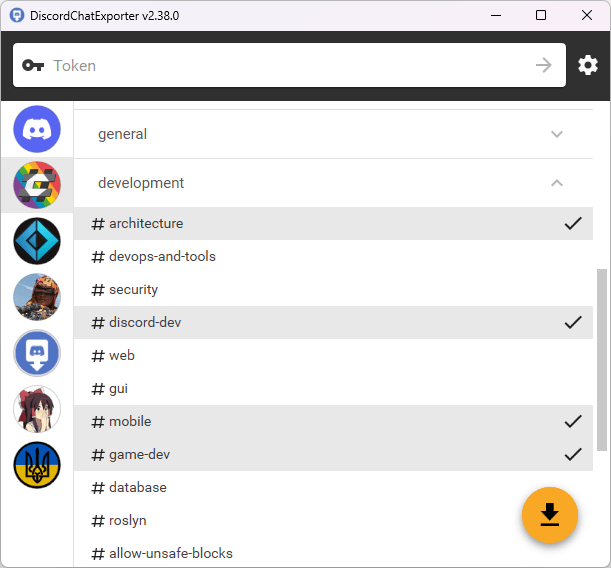
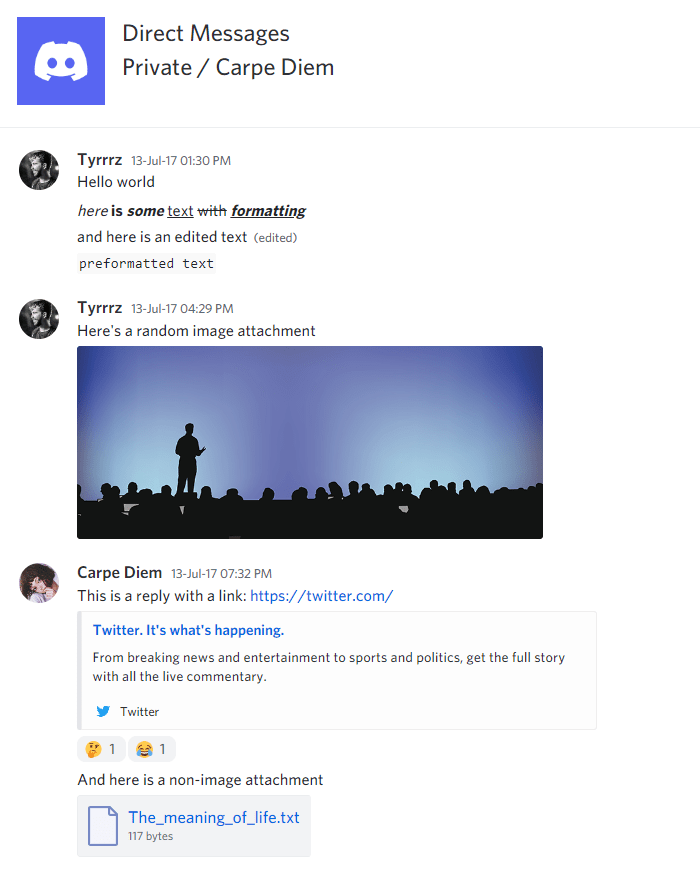
See also
- Chat Analytics — solution for analyzing chat patterns of Discord users, using exports produced by DiscordChatExporter.
- DiscordChatExporter-frontend — convenient viewer for exports produced by DiscordChatExporter.