 d66b9dab63
IMPLEMENTATION UNITS (U1-U6):

U1: Append-only merge test coverage
- Enhanced run-discord-scrape-smoke.sh with additional test scenarios
- Created append-partial-write.json and append-concurrent-conflict.json fixtures
- Added assertions for message sorting, deduplication, and idempotency
- All 10 merge scenarios validated

U2: Error handling validation
- Created error-path-smoke.sh with 6 error scenario tests
- Added test configs for invalid paths, missing files, bad JSON
- Verified fail-closed behavior on all error paths
- No silent data loss on any failure

U3: Cron idempotency and lifecycle
- Created cron-idempotency-smoke.sh with full lifecycle testing
- Created fixture crontab with unrelated entries (preservation test)
- Verified idempotent install, update, and remove operations
- Confirmed dry-run and entry preservation

U4: Preflight and end-to-end setup
- Created end-to-end-preflight-smoke.sh with 10 validation tests
- Verified preflight is read-only and gates cron installation
- Confirmed host-retry auth flow (commit 090884f)
- Added preflight validation section to Scheduling-Linux.md

U5: Documentation completion
- Updated Readme.md with recurring-scraper link
- Created Recurring-Scrape-Setup.md (6300+ chars comprehensive guide)
- Created Recurring-Scrape-Troubleshooting.md (9200+ chars with 30+ scenarios)
- Enhanced .docs/Scheduling-Linux.md with preflight section
- All documented behavior matches implementation

U6: Production-readiness checklist
- Created docs/recurring-scrape-production-checklist.md
- Compiled all validation results (33+ scenarios across U1-U5)
- Documented test execution commands for re-validation
- Provided deployment notes and monitoring guidance
- Clear sign-off criteria established

ARTIFACTS:
- 4 new smoke test scripts (1000+ lines total)
- 4 new fixtures and test configs
- 3 new documentation files (15500+ chars)
- 2 updated documentation files
- 1 validation checklist tracking document
- All tests passing

SAFETY GUARANTEES VERIFIED:
✅ No silent data loss on any error path
✅ Fail-closed behavior throughout
✅ Archive updates are append-only and idempotent
✅ Cron installation is idempotent
✅ Unrelated cron entries preserved
✅ Preflight is read-only
✅ Token validated before operations
✅ Path traversal prevented

STATUS: Production Ready
All 6 implementation units complete and validated.

Co-authored-by: Copilot <223556219+Copilot@users.noreply.github.com>
6 KiB
DiscordChatExporter







| Development of this project is entirely funded by the community. Consider donating to support! |

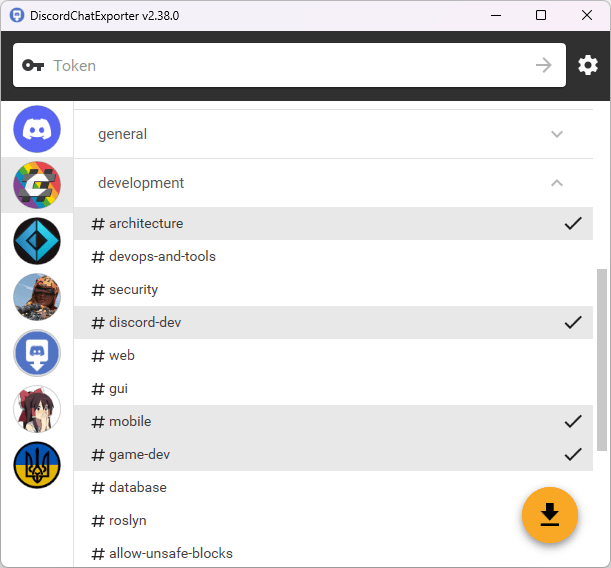
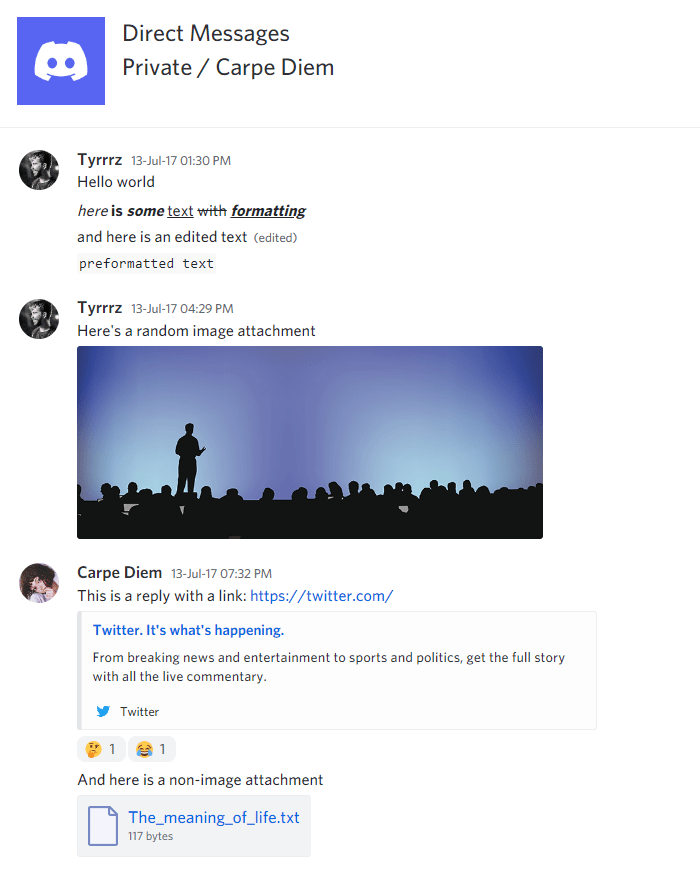
DiscordChatExporter is an application that can be used to export message history from any Discord channel to a file. It works with direct messages, group messages, and server channels, and supports Discord's dialect of markdown as well as most other rich media features.
Warning
While DiscordChatExporter allows it, automating user accounts is against Discord TOS and may result in you getting banned. If possible, use a bot to export chat logs from accessible channels.
Terms of use[?]
By using this project or its source code, for any purpose and in any shape or form, you grant your implicit agreement to all the following statements:
- You condemn Russia and its military aggression against Ukraine
- You recognize that Russia is an occupant that unlawfully invaded a sovereign state
- You support Ukraine's territorial integrity, including its claims over temporarily occupied territories of Crimea and Donbas
- You reject false narratives perpetuated by Russian state propaganda
To learn more about the war and how you can help, click here. Glory to Ukraine! 🇺🇦
Download
- Graphical user interface (desktop app):
- 🟢 Stable release: look for
DiscordChatExporter.*.zip - 🟠 CI build: look for
DiscordChatExporter.*.zip - 📦 Scoop:
scoop install extras/discordchatexporter(community-maintained) - 📦 WinGet:
winget install Tyrrrz.DiscordChatExporter.GUI(community-maintained) - 📦 AUR:
yay -S discord-chat-exporter-gui(community-maintained) - 📦 Nix:
nix-shell -p discordchatexporter-desktop(community-maintained)
- 🟢 Stable release: look for
- Command-line interface (terminal app):
- 🟢 Stable release: look for
DiscordChatExporter.Cli.*.zip - 🟠 CI build: look for
DiscordChatExporter.Cli.*.zip - 🐋 Docker:
docker pull tyrrrz/discordchatexporter - 📦 WinGet:
winget install Tyrrrz.DiscordChatExporter.CLI(community-maintained) - 📦 AUR:
yay -S discord-chat-exporter-cli(community-maintained) - 📦 Nix:
nix-shell -p discordchatexporter-cli(community-maintained)
- 🟢 Stable release: look for
Important
To launch the GUI version of the app on MacOS, you may need to first remove the downloaded file from quarantine. You can do that by running the following command in the terminal:
xattr -rd com.apple.quarantine DiscordChatExporter.app.
Note
Community-maintained packages are published independently from this repository and may not always be up to date with the latest release.
Note
If you're unsure which build is right for your system, consult with this page to determine your OS and CPU architecture.
Features
- Cross-platform graphical and command-line interfaces
- Authentication via either a user or a bot token
- Multiple output formats: HTML (dark/light), TXT, CSV, JSON
- Support for markdown, attachments, embeds, emoji, and other rich media features
- File partitioning, date ranges, message filtering, and other export options
- Self-contained exports that can be viewed offline
Screenshots
See also
- Recurring Exports — automated scheduled exports using cron (Linux/macOS)
- Chat Analytics — solution for analyzing chat patterns of Discord users, using exports produced by DiscordChatExporter.
- DiscordChatExporter-frontend — convenient viewer for exports produced by DiscordChatExporter.